 WebWell
Blog · Data study
What permissions do new tab and focus extensions really ask for?
Every browser extension has to declare what it can do. That declaration, a file called manifest.json, is public for open-source projects, so anyone can read it. We read it for seven popular open-source new tab, focus and blocking extensions and put the results in one place: what each one asks for, which asks are optional, and what the pattern says about how to judge an extension.
Disclosure: I make WebWell, and it is one of the seven. It is also the extension that asks for the most required permissions, and I haven't hidden that. The data is from public files that anyone can download, the method is below, and a CSV of the full dataset is free to use.
Key findings
storage) is all the two plain new tab pages ask for up front- Everything asks for
storage, and only storage separates the quietest extensions from the rest. - Features, not size, decide the ask. The extensions that track or block your time need
tabsorwebNavigation(3 of 7); the pure new tab pages do not. - Access to all websites is the real split: 2 extensions require it at install (LeechBlock NG and ActivityWatch Web Watcher), 2 ask only when you turn a feature on (News Feed Eradicator and WebWell), and 3 never ask (Tabliss, Bonjourr, Marinara).
- A permission count is a poor safety score. WebWell lists 11 required permissions but makes all-sites access optional. LeechBlock NG lists 6 and requires all-sites access.
- Maintenance varies a lot: 5 of 7 projects had code pushed in the 90 days before our snapshot. One repository (Marinara) still ships a Manifest V2 manifest and has not changed since 2023-05-28.
Why this is worth checking
An extension runs inside the program you use for almost everything: email, banking, work. A new tab page looks harmless, but depending on what it asks for, an extension can see which sites you visit, read what is on a page, or change it. Most people accept the install prompt without reading it, and the store listing seldom explains why each permission is there.
The question is not "is this extension safe?", which a permission list cannot answer. It is smaller and easier: does what it asks for match what it does? A clock does not need to read every page. A site blocker has a real reason to see which address you are visiting. This study maps those asks so you can make the comparison yourself.
How we did it (and how to repeat it)
We picked seven open-source extensions in four categories that people use to feel calmer or more focused: new tab pages, a Pomodoro timer, site and feed blockers, and a time tracker. We used open-source projects on purpose, because their manifests are public on GitHub and anyone can check our numbers. For each one we downloaded the manifest from the project's default branch on 2026-10-22 and recorded:
- the required permissions (granted when you install),
- the optional permissions (requested later, when you use a feature),
- whether it asks for access to all websites, and whether that is required or optional,
- whether it replaces the new tab page, plus its licence, version and the date of its last code change.
We read the Chromium (Chrome and Brave) version where a project ships separate manifests. To repeat the check, download each file yourself:
# Tabliss
curl -s https://raw.githubusercontent.com/joelshepherd/tabliss/main/target/chromium/manifest.json
# Bonjourr
curl -s https://raw.githubusercontent.com/victrme/Bonjourr/master/src/manifests/chrome.json
# News Feed Eradicator
curl -s https://raw.githubusercontent.com/jordwest/news-feed-eradicator/main/src/manifest.ts
# Marinara
curl -s https://raw.githubusercontent.com/schmich/marinara/master/package/manifest.json
# LeechBlock NG
curl -s https://raw.githubusercontent.com/proginosko/LeechBlockNG/master/manifest.json
# ActivityWatch Web Watcher
curl -s https://raw.githubusercontent.com/ActivityWatch/aw-watcher-web/master/src/manifest.json
# WebWell
curl -s https://raw.githubusercontent.com/Adnan705/webwell/main/manifest.json
Two files need a note. ActivityWatch writes one source manifest for several browsers, so we used the keys marked for Chrome. News Feed Eradicator generates its manifest from a TypeScript file. Because default branches move on, files you download later may differ from our snapshot, which is why every figure here carries a date.
The data
All-sites access: none
All-sites access: none
All-sites access: optional
All-sites access: none
All-sites access: required
All-sites access: required
All-sites access: optional
required optional The number is how many permissions are required at install. Open the full infographic.
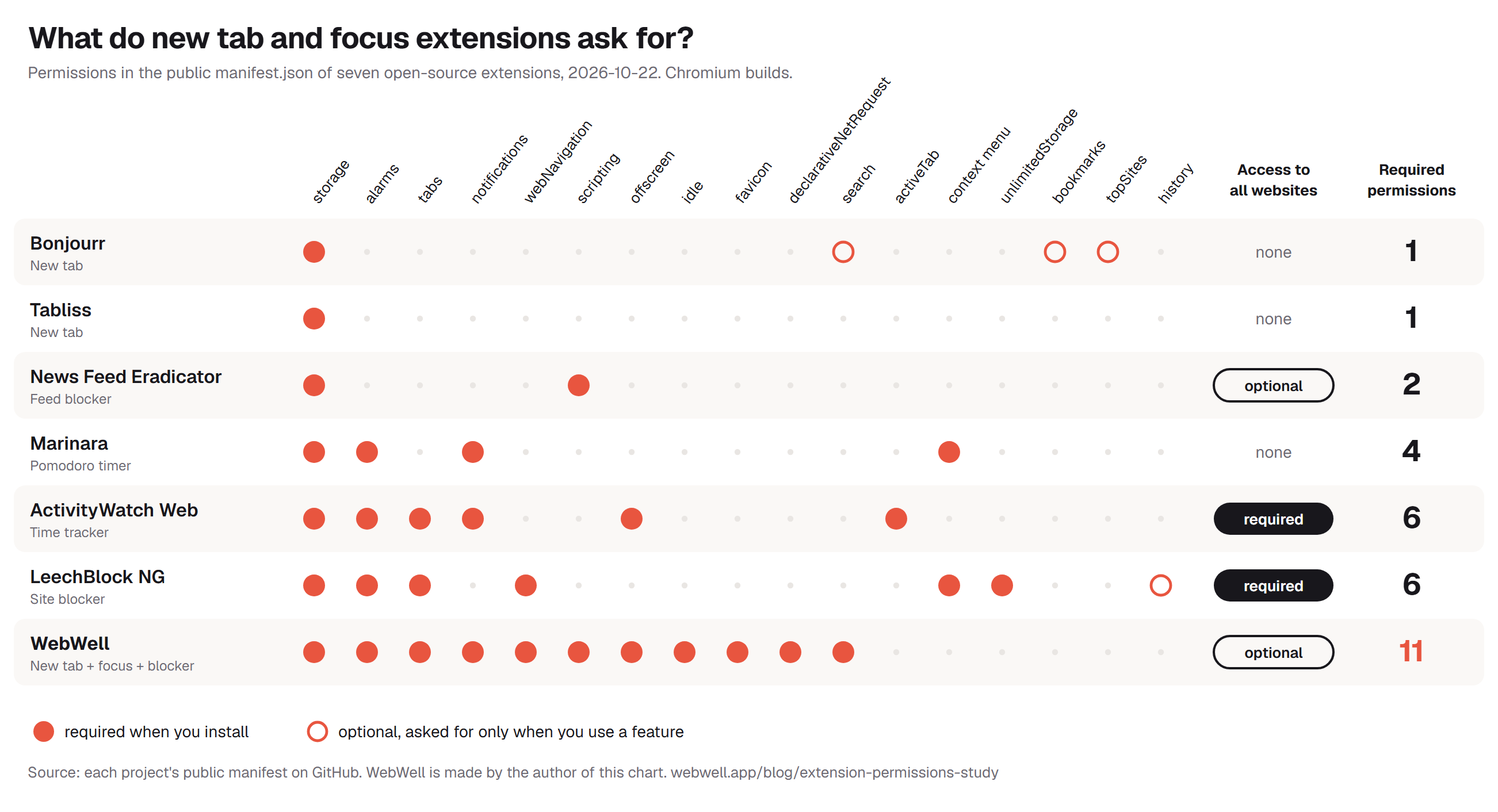
Required and optional permissions, grouped by extension. Source: each project's public manifest, 2026-10-22. Save the image or copy the embed code at the end of this article.
| Extension | Required permissions | All-sites access | Optional | Last push | Licence |
|---|---|---|---|---|---|
| Bonjourr New tab | storage | None | bookmarks, topSites, search | 2026-10-20 | GPL-3.0 |
| Tabliss New tab | storage | None | none | 2024-08-19 | GPL-3.0 |
| News Feed Eradicator Feed blocker | storage, scripting | Optional | none | 2026-08-23 | AGPL-3.0 |
| Marinara Pomodoro timer | alarms, contextMenus, storage, notifications | None | none | 2023-05-28 | MIT |
| ActivityWatch Web Watcher Time tracker | tabs, alarms, notifications, activeTab, offscreen, storage | Required | none | 2026-10-22 | MPL-2.0 |
| LeechBlock NG Site blocker | alarms, menus, storage, tabs, unlimitedStorage, webNavigation | Required | history | 2026-09-27 | MPL-2.0 |
| WebWell New tab + focus + blocker + tracker | tabs, storage, idle, alarms, notifications, offscreen, favicon, declarativeNetRequest, scripting, webNavigation, search | Optional | none | 2026-10-22 | MIT |
WebWell also names four specific services it can contact (the Google Gemini API, SoundCloud and Spotify's embedded player). Last push is the date of the latest change to the repository, not a release date.
What the numbers show
1. The two plain new tab pages ask for almost nothing
Tabliss requires only storage, and Bonjourr requires only storage too, with three optional extras (bookmarks, topSites and search) that it asks for when you use the matching feature. Both replace your new tab page and neither requests access to any website. If all you want is a calm page with a clock and a photo, this is the baseline, and anything that asks for much more should be able to say why.
2. Permissions follow features
Once an extension needs to know where you are in the browser, the ask grows. LeechBlock NG, ActivityWatch Web Watcher, WebWell request tabs and/or webNavigation, because tracking time or blocking a site starts with knowing the address of the page. Those are exactly the permissions that Chrome words as reading your browsing history. That is not suspicious by itself: it is what the feature costs. It is a reason to check what the extension says it does with that information.
3. All-sites access is the real dividing line
Access to every website is the broadest permission on the list: Chrome describes it as being able to read and change your data on all websites. The seven split three ways:
- Required at install (2): LeechBlock NG, ActivityWatch Web Watcher. For a site blocker or a tracker that watches every tab, this follows from the job, but it also means you grant it before you have used a feature.
- Optional (2): News Feed Eradicator, WebWell. The extension asks only when you switch on a feature that needs it, and works without it until then.
- Never requested (3): Tabliss, Bonjourr, Marinara.
The optional model is better for you as a user, because the permission arrives with a reason and you can say no. It costs the developer some convenience, which is probably why it is not the norm.
4. A permission count is a poor safety score
It is tempting to rank extensions by how many permissions they list. The data argues against it. WebWell lists the most required permissions (11) but keeps all-sites access optional. LeechBlock NG lists 6 and requires access to every website. Most of what WebWell asks for is individually narrow: alarms, idle and offscreen, for example, have no install warning of their own. What matters is what a permission lets the extension see or change, not how many there are.
Since WebWell is mine, here is why it lists eleven. It is a new tab page, a focus timer, a site and short-video blocker, a time tracker and a music player in one extension, and each feature needs its own few permissions. The privacy policy explains each one, and all the code is public, so you can check the claim instead of trusting it. If you only want a new tab page, Tabliss or Bonjourr will ask you for far less, and that is a fair reason to choose either.
5. Maintenance matters as much as permissions
An extension with a tiny permission list is still a risk if nobody maintains it. 5 of the 7 repositories saw code changes in the 90 days before our snapshot. Marinara's repository still ships a Manifest V2 manifest and has not changed since 2023-05-28, so what is in the store may differ from what is on GitHub. Tabliss uses Manifest V3 but has had no code pushed since 2024-08-19. Neither fact says an extension is unsafe, but both belong in a decision, and the store page's "last updated" date is worth a look.
6. Open source is what made this possible
All seven are open source, and licences range from MIT to AGPL. That is why anyone can repeat this work. Closed-source extensions can also be inspected once installed, but they are harder to compare side by side, and a public manifest on GitHub does not prove that the store build matches it. Open source narrows that gap: you can read the code, build it yourself, and check for differences.
Every permission, in plain English
These are all the permissions that appear in the dataset, with what each allows and which of the seven require it. Chrome shows an install warning for some of them (all-sites access, history, bookmarks, topSites and tabs are the ones to watch for) and none for others, such as storage and alarms.
| Permission | What it lets the extension do | Required by |
|---|---|---|
storage | Save the extension’s own settings and data inside your browser. | Tabliss, Bonjourr, News Feed Eradicator, Marinara, LeechBlock NG, ActivityWatch Web Watcher, WebWell |
alarms | Wake the extension up at set times, which is how timers and reminders work. | Marinara, LeechBlock NG, ActivityWatch Web Watcher, WebWell |
tabs | See the address and title of your open tabs, and open, move or close them. Chrome describes this as reading your browsing history. | LeechBlock NG, ActivityWatch Web Watcher, WebWell |
notifications | Show desktop notifications. | Marinara, ActivityWatch Web Watcher, WebWell |
webNavigation | Be told when you move between pages, including the address you are going to. Also described as reading your browsing history. | LeechBlock NG, WebWell |
scripting | Run code inside web pages. By itself it reaches nothing: it only works on sites the extension also has access to. | News Feed Eradicator, WebWell |
offscreen | Open a hidden page, used for things a Manifest V3 background worker cannot do, such as playing audio. | ActivityWatch Web Watcher, WebWell |
idle | Know when you are away from the computer or your screen is locked. | WebWell |
favicon | Read website icons from the browser’s own cache. | WebWell |
declarativeNetRequest | Block or redirect web requests using rules that the browser applies itself. The extension does not read the pages. | WebWell |
search | Run a search with your default search engine. | WebWell Optional: Bonjourr |
activeTab | Temporary access to the tab you are on, granted when you click the extension. | ActivityWatch Web Watcher |
context menu | Add items to the right-click menu. Listed as contextMenus in Chrome and menus in Firefox-style manifests. | Marinara, LeechBlock NG |
unlimitedStorage | Store more data than the normal browser quota. | LeechBlock NG |
bookmarks | Read, and optionally change, your bookmarks. | none of the seven Optional: Bonjourr |
topSites | Read a list of the sites you visit most. | none of the seven Optional: Bonjourr |
history | Read and change your browsing history. | none of the seven Optional: LeechBlock NG |
<all_urls> | Read and change data on every website you visit. The broadest permission here. | LeechBlock NG, ActivityWatch Web Watcher Optional: News Feed Eradicator, WebWell |
How to audit any extension in five minutes
- Read the install prompt. Chrome lists what the extension can do before you click Add. Treat "read and change all your data on all websites" as a question, not a formality.
- Look at site access after install. Open
chrome://extensions(orbrave://extensions), choose Details, and check Site access. You can change it to "on click" or "on specific sites" for many extensions. - Read the manifest. Turn on Developer mode, note the extension's ID, and open
manifest.jsonfrom your profile's Extensions folder. On Windows, Chrome keeps it under%LocalAppData%\Google\Chrome\User Data\Default\Extensions\<id>\<version>\and Brave under%LocalAppData%\BraveSoftware\Brave-Browser\User Data\Default\Extensions\. Look atpermissions,optional_permissionsandhost_permissions. - Match each ask to a feature you use. If you cannot find the feature that needs a permission, ask the developer, or pick another extension.
- Read the privacy policy for specifics. Good ones say what is stored, where, and when anything is sent. "We take privacy seriously" says nothing.
- Check the date and the source. When was it last updated? Is the code public? Is the developer reachable?
Green flags and red flags
| Green flags | Red flags |
|---|---|
| Permissions are asked for when you use the feature | All-sites access required for something that does not need it |
| Public source code and a licence | No privacy policy, or one that says nothing specific |
| A privacy policy that names what is stored and sent | Needs an account for a feature that could work offline |
| Recent updates and a way to contact the developer | Long gaps in updates, or an unclear owner |
| Works with optional access switched off | Requests keep growing with each version |
Limits, and how to correct us
- Seven is a small sample. It is not a representative cross-section of all extensions. The most popular extensions in the store are mostly closed source, and we have not included them.
- A manifest shows capability, not behaviour. It says what an extension can do. It does not prove what it does. Reading the code, or the privacy policy, is the next step.
- Repository manifests may differ from store builds. Packaging tools can change or add keys, and the store version may be older or newer than the default branch.
- A count treats all permissions as equal.
storageandhistorydo not carry the same weight, which is why we separate required from optional and highlight all-sites access instead of ranking by count. - Snapshots go stale. Stars, versions and permissions all change. Every figure here is dated 2026-10-22.
If we got something wrong about your extension, or you would like it added to the dataset, email info.adnanak@gmail.com or open an issue on GitHub. We will correct the article and note the date of the change here.
Use this data
You are welcome to reuse the infographic, the table and the CSV, in articles, newsletters, talks or class material, as long as you link back to this page. The data is released under Creative Commons Attribution 4.0.
Embed the infographic
Copy this code into your page:
Cite it
WebWell. "What Permissions Do New Tab and Focus Extensions Really Ask For?" webwell.app, 23 October 2026. https://webwell.app/blog/extension-permissions-study
Questions
Is an extension with more permissions less safe?
Not necessarily. What matters is what the permissions allow and whether the extension needs them. A long list of narrow permissions can be less risky than one broad one such as access to all websites.
What is the safest kind of new tab extension?
One that asks for the least and does only what you need. In our data, the two plain new tab pages needed only storage to install. If you want a timer, blocking or tracking as well, more permissions are expected, so prefer extensions that ask for broad access only when you turn a feature on.
Why do blockers need access to all websites?
To block or change a page, the browser has to let the extension act on it. Some extensions use the browser's own rule system, which does not read page content. Others run code inside pages. Both can ask for broad access, which is why the reasoning matters more than the permission name.
Can I use any of this for my own article?
Yes. Link to this page and use the CSV, the table or the infographic. The embed code above handles the attribution for you.
How often will you update it?
The dataset is dated 2026-10-22. We plan to refresh it and add more extensions, and every update will carry a new date and a list of changes.